> ## Documentation Index
> Fetch the complete documentation index at: https://wb-21fd5541-docs-2751.mintlify.site/llms.txt
> Use this file to discover all available pages before exploring further.
> Define, initialize, and run a sweep to search a hyperparameter space and find the configuration that produces the best model.
# Tutorial: Define, initialize, and run a sweep
This tutorial shows how to define, initialize, and run a sweep so you can automate hyperparameter search and find the configuration that produces the best model. It's intended for users who are already familiar with logging runs to W\&B and want to start tuning hyperparameters at scale.
The tutorial has four main steps:
1. [Set up your training code](#set-up-your-training-code)
2. [Define the search space with a sweep configuration](#define-the-search-space-with-a-sweep-configuration)
3. [Initialize the sweep](#initialize-the-sweep)
4. [Start the sweep agent](#start-the-sweep)
To get started, copy and paste the following code into a Jupyter Notebook or Python script. The sections that follow break down each part of this example.
```python theme={null}
# Import the W&B Python Library and log into W&B
import wandb
# 1: Define objective/training function
def objective(config):
score = config.x**3 + config.y
return score
def main():
with wandb.init(project="my-first-sweep") as run:
score = objective(run.config)
run.log({"score": score})
# 2: Define the search space
sweep_configuration = {
"method": "random",
"metric": {"goal": "minimize", "name": "score"},
"parameters": {
"x": {"max": 0.1, "min": 0.01},
"y": {"values": [1, 3, 7]},
},
}
# 3: Start the sweep
sweep_id = wandb.sweep(sweep=sweep_configuration, project="my-first-sweep")
wandb.agent(sweep_id, function=main, count=10)
```
## Set up your training code
The sweep agent calls your training function with each combination of hyperparameter values to try, so the first step is to write a function that accepts those values and reports a metric back to W\&B.
Define a training function that takes in hyperparameter values from `wandb.Run.config` and uses them to train a model and return metrics.
Optionally provide the name of the project where you want to store the output of the run (project parameter in [`wandb.init()`](/models/ref/python/functions/init)). If you don't specify a project, W\&B puts the run in an "Uncategorized" project.
Both the sweep and the run must be in the same project. Therefore, the name you provide when you initialize W\&B must match the name of the project you provide when you initialize a sweep.
```python theme={null}
# 1: Define objective/training function
def objective(config):
score = config.x**3 + config.y
return score
def main():
with wandb.init(project="my-first-sweep") as run:
score = objective(run.config)
run.log({"score": score})
```
## Define the search space with a sweep configuration
With the training function in place, the next step is to tell W\&B which hyperparameters to vary and how to search over them.
Specify the hyperparameters to sweep in a dictionary. For configuration options, see [Define sweep configuration](/models/sweeps/define-sweep-configuration).
The following example shows a sweep configuration that uses a random search (`'method':'random'`). The sweep randomly selects a set of values listed in the configuration for the `x` and `y` parameters.
W\&B minimizes the metric specified in the `metric` key when `"goal": "minimize"` is associated with it. In this case, W\&B optimizes for minimizing the metric `score` (`"name": "score"`).
```python theme={null}
# 2: Define the search space
sweep_configuration = {
"method": "random",
"metric": {"goal": "minimize", "name": "score"},
"parameters": {
"x": {"max": 0.1, "min": 0.01},
"y": {"values": [1, 3, 7]},
},
}
```
## Initialize the sweep
Initializing the sweep registers your search space with W\&B and returns an identifier that the agent uses to request hyperparameter combinations.
W\&B uses a *Sweep Controller* to manage sweeps in the cloud (standard) or locally (local) across one or more machines. For more information about Sweep Controllers, see [Search and stop algorithms locally](/models/sweeps/local-controller).
Initializing a sweep returns a sweep identification number:
```python theme={null}
sweep_id = wandb.sweep(sweep=sweep_configuration, project="my-first-sweep")
```
For more information, see [Initialize sweeps](/models/sweeps/initialize-sweeps).
## Start the sweep
With the sweep registered, start an agent to execute the runs and explore the search space.
To start a sweep, use the [`wandb.agent()`](/models/ref/python/functions/agent) API call.
```python theme={null}
wandb.agent(sweep_id, function=main, count=10)
```
After the agent starts, it requests hyperparameter combinations from W\&B, calls your training function for each one, and logs the resulting metrics back to your project.
**Multiprocessing**
If you use the Python standard library's `multiprocessing` package or PyTorch's `pytorch.multiprocessing` package, you must wrap your `wandb.agent()` and `wandb.sweep()` calls with `if __name__ == '__main__':`. For example:
```python theme={null}
if __name__ == '__main__':
wandb.agent(sweep_id="[SWEEP-ID]", function="[FUNCTION]", count="[COUNT]")
```
This convention ensures the code runs only when the script runs directly, not when imported as a module in a worker process.
For more information about multiprocessing, see [Python standard library `multiprocessing`](https://docs.python.org/3/library/multiprocessing.html#the-spawn-and-forkserver-start-methods) or [PyTorch `multiprocessing`](https://docs.pytorch.org/docs/stable/notes/multiprocessing.html#asynchronous-multiprocess-training-e-g-hogwild). For more information about the `if __name__ == '__main__':` convention, see [Real Python's guide to `__main__`](https://realpython.com/if-name-main-python/).
## Optional: Visualize results
Once the sweep is running, you can explore how different hyperparameter combinations affect your metric in the W\&B App.
Open your project to see your live results in the W\&B App dashboard. In a few clicks, build interactive charts such as [parallel coordinates plots](/models/app/features/panels/parallel-coordinates), [parameter importance analyses](/models/app/features/panels/parameter-importance), and [other chart types](/models/app/features/panels).
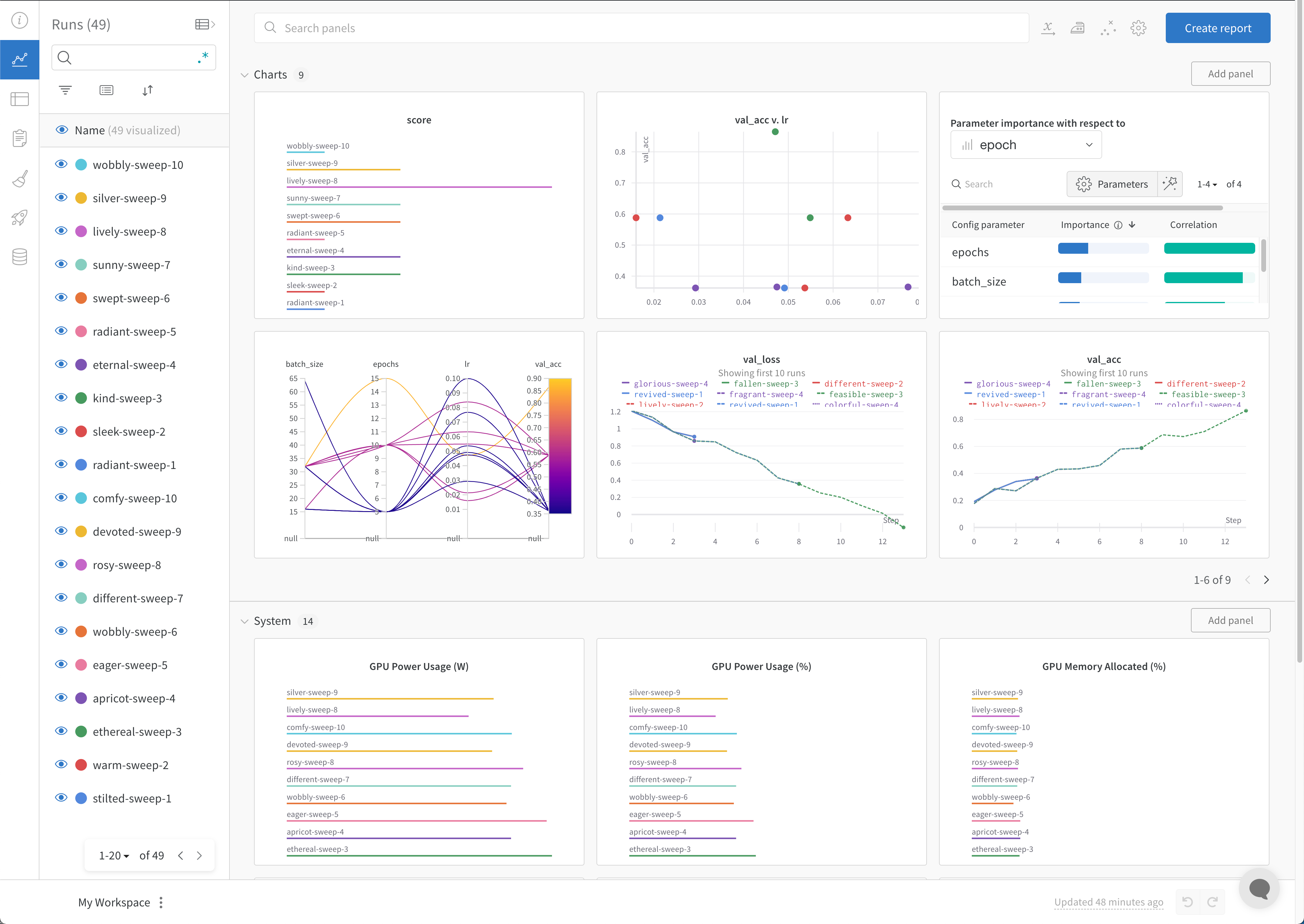 For more information, see [Visualize sweep results](/models/sweeps/visualize-sweep-results). For an example dashboard, see this sample [Sweeps Project](https://wandb.ai/anmolmann/pytorch-cnn-fashion/sweeps/pmqye6u3).
## Optional: Stop the agent
In the terminal, press `Ctrl+C` to stop the current run. Press it again to end the agent.
For more information, see [Visualize sweep results](/models/sweeps/visualize-sweep-results). For an example dashboard, see this sample [Sweeps Project](https://wandb.ai/anmolmann/pytorch-cnn-fashion/sweeps/pmqye6u3).
## Optional: Stop the agent
In the terminal, press `Ctrl+C` to stop the current run. Press it again to end the agent.